 RizzGen
The Missing Support Button: Why AI Apps Are So Hard to Get Help From
Something breaks in an AI app, and you go looking for help — and there's nowhere to go. No support link, no reply for days, or a contact form gated behind an enterprise plan. The absence is so common it reads as policy. We think support should live inside the same conversation where the problem happened, so we built it that way.
 Support that lives inside the same conversation where the problem happened. Abstract photography by RizzGen.
Think about the last time something went wrong in an AI product. A generation failed halfway. A file wouldn't export. Credits disappeared and you couldn't tell why. Now think about what you did next — and how long it took to find anywhere to even ask.
For most AI apps, that second part is the real problem. The software is impressive. Getting a human to acknowledge that it broke is not.
Full disclosure before we go further: we build RizzGen, and the feature at the end of this piece is ours. But the pattern we're describing isn't about us — it's something anyone who has used a modern AI tool has run into, and it's worth naming clearly.
The Support Gap Is Not an Accident
Across the AI category, four failure modes show up again and again.
There's no obvious place to raise a query. The product is a chat box and a canvas. Support, if it exists, is a link buried in a footer, a Discord server you have to find, or a knowledge base that answers everything except your actual question. You end up searching the company's own website to find a way to contact the company.
Replies come days late, if at all. Many AI teams are small, moving fast, and treating support as overhead. A ticket goes into an inbox and surfaces whenever someone gets to it. For a creator on a deadline, "whenever" is the same as "never."
You have to reconstruct the problem from scratch. Even when there is a form, it drops you into a blank field far away from where the issue happened. Now you're copying error text, remembering what you clicked, and explaining context the app already had.
Real support is reserved for enterprise. This is the quiet one. Plenty of large AI platforms — Meta's business tools are a familiar example — offer meaningful, responsive support only to enterprise accounts. Everyone else gets a help center and a prayer. Your access to a human scales with your contract size, not with how stuck you are.
None of these is a scandal on its own. Together, they add up to a category-wide norm: the more AI-native a product is, the harder it often is to get a human to help when the AI part fails.
Why This Happens
It's worth being fair about the causes, because they're structural, not lazy.
AI products break in unfamiliar ways. A traditional SaaS bug is reproducible; an AI failure can depend on a prompt, a model version, a random seed, and a provider's uptime all at once. That makes support genuinely harder, so teams under-invest in it and lean on documentation.
Support is also expensive and doesn't demo well. Funding and attention flow to the model and the interface. A responsive support experience never shows up in a launch video, so it's the first thing cut and the last thing built.
And bolting support on afterward is awkward. If the product wasn't designed with a place to ask for help, adding one later means a form that lives outside the actual work — disconnected from the conversation, the project, and the thing that broke.
Understandable. Still not good enough — especially when the same AI that powers the product could power the support.
The Fix: Put Support Where the Problem Happened
Here's the reframe. In an AI-native product, you're already in a conversation with an agent that has context about your work. That is the single best place to ask for help — not a separate portal, not an email you compose from memory, not a plan upgrade.
So when we designed support for RizzGen, we started from one principle: you should be able to get help from the same chat where the problem occurred, without explaining it twice. We call it Rizzi-Native Support, and it works like this.
1. You just say what went wrong
In any normal chat, you describe the problem in plain language — "my finished video has no audio." Rizzi, our creative agent, already has the conversation and the relevant project context, so it doesn't need you to reconstruct anything. It first tries to actually fix the issue, including retrying a generation where that's the right move.
2. If it can't fix it, it prepares a request for you
When Rizzi can't resolve something in chat, it offers to prepare a support request — and shows you a preview first: a short subject, a clear summary of the problem in plain terms, and any detail you added. Nothing is sent yet. You can tell Rizzi to change the details, or submit as-is.
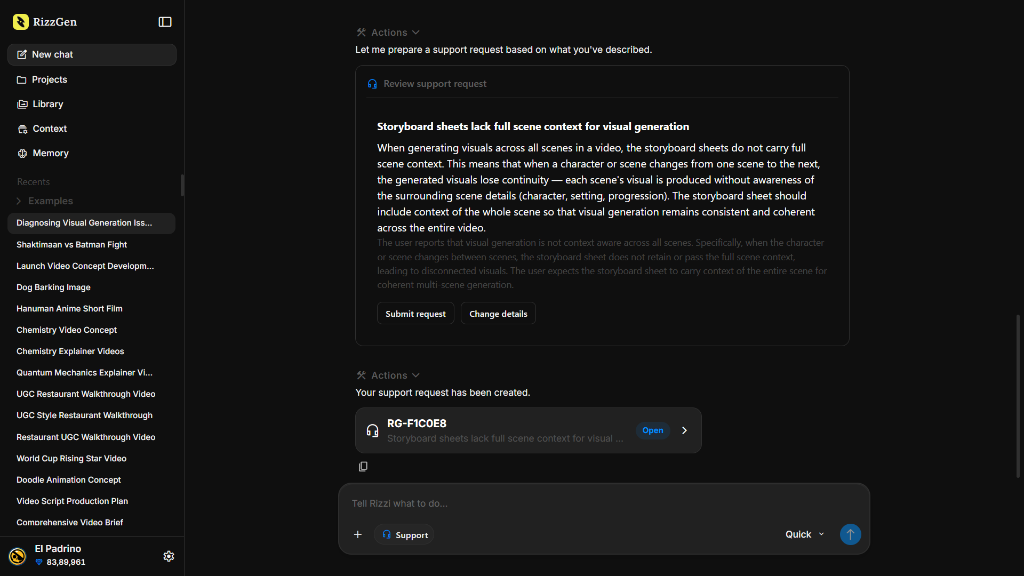 The Rizzi-Native Support interface: reviewing an automated request draft (top) and tracking a created ticket (bottom).
3. You submit with one tap
The request is only created when you press Submit request — no accidental tickets from routine chat. You get a friendly ticket number like RG-ABC123, a status, and a link to track it. The relevant technical context travels with the request automatically, so the support team can investigate without making you paste stack traces you were never meant to see.
4. You can always find it again
Every request you've raised lives in Settings → Support, with its status — Open, Investigating, Waiting on user, Resolved, Closed — and an unread marker when the team has replied. You read replies there and continue the conversation. Reply to something marked resolved and it reopens automatically. No hunting, no lost threads.
Why "Native" Matters Here
The word support is easy. The word native is the part that changes the experience.
Because the request starts inside the conversation, you never leave your work to ask for help. Because Rizzi already holds the context, you don't rebuild the problem in a blank form. Because the technical detail is attached automatically but kept separate from what you see, the team gets what it needs to investigate while you get a clean, human-readable summary — no exception text, no internal notes, no diagnostic identifiers leaking into your view.
And critically, it isn't gated. Raising a request isn't an enterprise feature or a premium tier. It's how the product works, for everyone using it.
What This Isn't
We'd rather be precise than oversell. In this version, support replies appear in the request thread in Settings, not as new messages back in your original chat. There are no email notifications, push notifications, file attachments, or promised response-time SLAs yet, and no ticket deletion. It's an in-product request-and-reply experience, built to make asking for help effortless — not a full external helpdesk pretending to be something it isn't.
That honesty is the point. The goal was never to look like we have world-class support. It was to remove the specific, maddening gap that the rest of the category has quietly normalized: the moment something breaks and there is simply nowhere to turn.
The Bottom Line
Most AI apps ask you to be impressed by what they can generate, then leave you stranded the moment generation fails. The support button is missing, the reply is slow, or the help is reserved for whoever signed the biggest contract.
Support should be as native as the rest of the product. If the agent can research, script, and render a film with you, it can also help you when something goes wrong — from the same conversation, without a portal, without a wait for a link, and without an enterprise plan.
You direct. Rizzi executes. And when it can't, it helps you get unstuck. Start a project — or if you're ever locked out, our support page is one click away.